
ANDROID RELEASE · 8 NOVEMBER 2026
SMC Crows v4.0
SMC Crows v4.0 for Android is available now. Build 4080323 fixes the Ask Riko crash and updates the Ko-fi link. Lucky Ball Open 1 may be unresponsive on the first launch after installation. If it happens, fully quit and reopen the game. Some voice lines may have pronunciation or timing issues, and 98 voice slots use the original recordings.
Choose game text and voice audio separately. The five new voice languages are Russian, Bahasa Melayu (Malaysia), Spanish (Spain), Portuguese (Portugal) and Portuguese (Brazil).
— MiloSuam
INSTALL AND PLAY
Three steps. Then Play.
No Termux or manual game-folder copying.
- Install the APK. Keep 10–15 GB free. For an existing compatible game, back up your account and update over it.
- Open Setup. Prepare the resources over Wi-Fi. Follow the original first-start and explicit Crows continuation prompts.
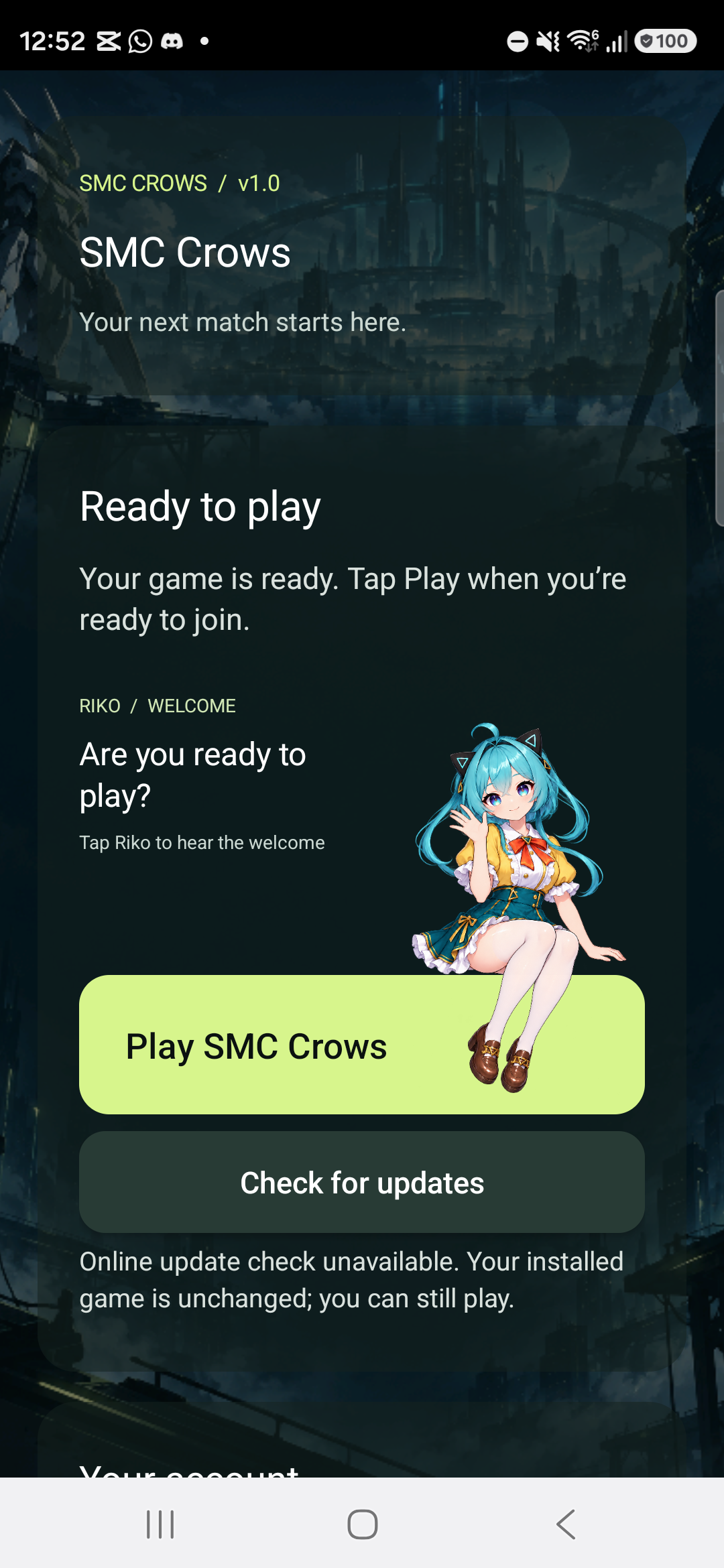
- Tap Play SMC Crows. Setup waits for you. It does not automatically launch the game.
Tap to view full size.
Ready when you are.
Check for updates sits below Play. A failed optional check does not block an already verified game.
Touch Riko to replay the synthetic welcome. Rapid taps cannot overlap clips. Use media volume to change loudness or mute.
Community illustration and synthetic greeting; not an official performer recording.